In your cPanel, you can change PHP version, go in section Softwares, icon 'Select PHP version'
(If you do not see icon 'Select PHP Version', this means that you are on a cPanel server without Cloudlinux, see explanation at the bottom of this article.)
Observe the current PHP version, default is version 7, as it is the most performant with opcache server based, stable, secure.
NB : If you use NGINX PHP-FPM : see our dedicated article, PHP selectors from Cloudlinux and cPanel do not workHow to switch PHP version per domain ?
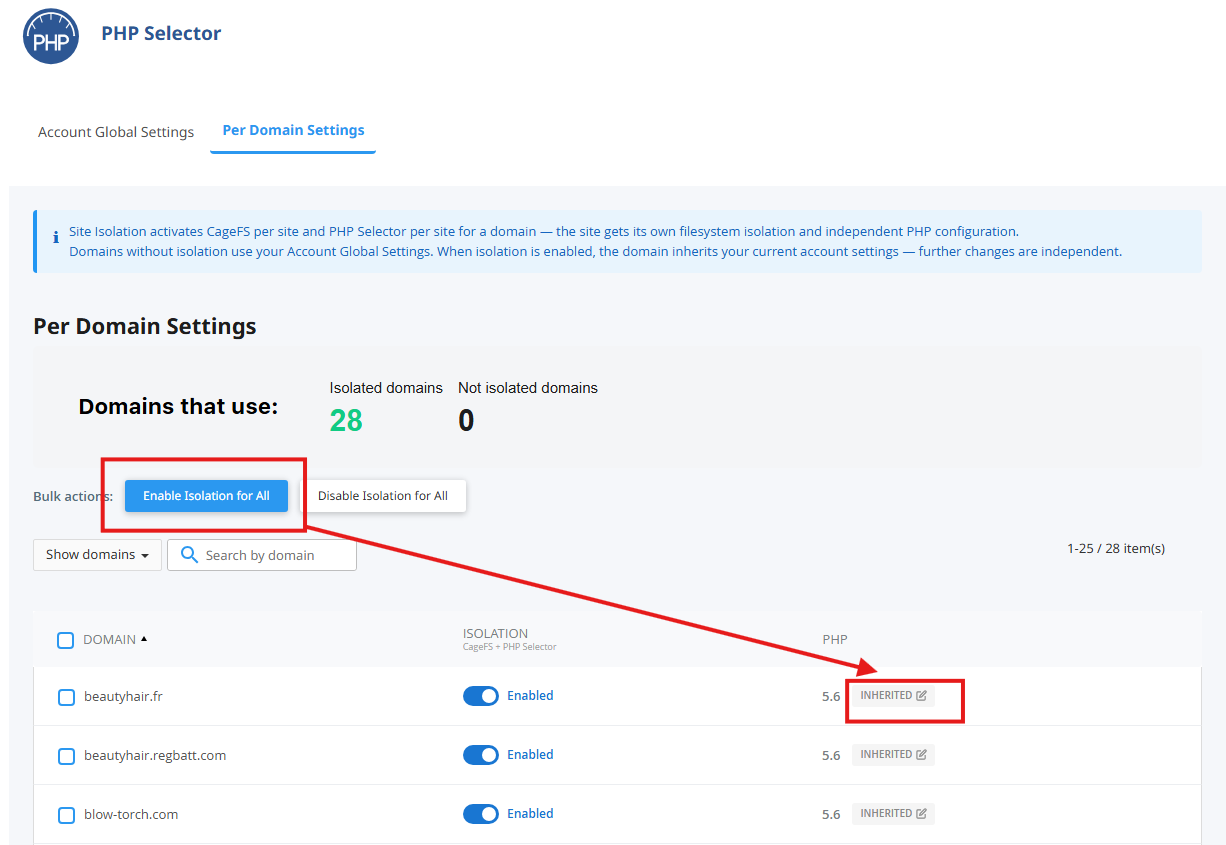
See image below, select 'Per Domain Settings', click 'Enable Isolation for All', wait a moment for the conversion process to complete, select line of the domain to customize by clicking 'inherited' on the right. Your can then set PHP version per domain, and also extensions precisely for the domain.
Here is the written list of the available php extensions, global (tab Account Global Settings depending on PHP versions )or per domain :
apcu, bcmath, brotli, dba, dbase, dom, eio, enchant, fileinfo, gd, gender, geoip, geos, gmagick, gnupg, grpc, http, igbinary, imagick, imap, inotify, interbase, ioncube loader, json, ldap, luasandbox, lzf, mailparse, mbstring, memcache, memcached, mongodb, mysqli, mysqlnd, nd mysqli, nd pdo mysql, newrelic, oauth, oci8, odbc, opcache, pdf, pdo, pdo dblib pdo firefebird, pdo mysql, pdo oci, pdo odbc, pdo sqlite, pdo sqlsrv, pgsql, phalcon3, phar, posix, propro, pspell, raphf, redis, snmp, soap, sockets, sodium, sourceguardian, sqlsrv, ssh2, stats, swool, sysvmsg, sysvsem, sysvshm, tideways, tidy, timzonedb, trader, uploadprogress, uuid, vips, wddx, xdebug, xmlreader, xmlrpc, xmlwriter, xsl, yaf, yaml, zip, zmq
You can also put a different PHP version for 1 or more domains of your account by adding a piece of code in the .htaccess to the root of the relevant website folder :
To customize your php.ini, see below tab Options next to extensions (global or per domain), click on the value of the setting you wish to update and save. At each change of PHP version. See our article for details : https://support.yoorshop.hosting/knowledgebase/115/Can-I-customize-my-phpini-.htmlNB :
activating memcache in Prestashop require to add server 127.0.0.1
activating memcache in Wordpress require to add extension WP-FFPC or similarFor cPanel server without Cloudlinux (custom hosting and HA offers)
In your cPanel, section Softwares, you have :
- icon 'MultiPHP manager' for choosing php versions per domain basis
- icon 'MultiPHP ini editor' to customize your php.ini per domain basis
(There is no possibility at your level to choose extension php, you must open a ticket and ask what you need)